How to connect HeyReach to an AI agent: what GTM AI agents can do with HeyReach in Day AI
Updated
The short answer. To connect HeyReach to an AI agent, give the agent HeyReach's MCP server with a HeyReach MCP key, so GTM AI agents, the part of AI for GTM that handles outreach, can work with your LinkedIn campaigns next to every email and meeting with the same people. In Day AI, whether you use it in place of your CRM or on top of Salesforce or HubSpot, a workspace Owner saves that shared MCP key once under Settings > Connectors, Day AI checks the key before saving it, and then each person clicks Connect, with HeyReach changes waiting for a person's approval.
Imagine you lead outbound at a supply-chain software company, and it's 11:20 on a Wednesday. You've just finished a discovery call with an operations director, and she named two colleagues who would sign off on any rollout: the head of procurement and a regional VP. Neither has heard from you. You ask your Day AI agent to set up LinkedIn outreach to both. It reads the call, finds the two names, checks HeyReach to make sure neither is already in a campaign or in a conversation with your team, and proposes a new HeyReach list with the two of them. Nothing reaches HeyReach until you say so. You approve it, ask the agent to add the list to the campaign you run for multi-threading, approve that card too, and ask for a task to check for replies on Monday, which lands in Day AI next to the deal. Lunch hasn't started yet, and both people are in front of a real campaign with a reason attached.
Where the usual answer goes wrong. Most LinkedIn outreach advice treats the campaign tool as its own island: build a list from a search, write the steps, watch the reply rate. The people who matter most are often the ones a buyer named on a call yesterday, and no search finds that. Day AI starts from the conversations your team has already had and works with HeyReach from there, with a person approving every change to a list or a campaign. If your team already runs good HeyReach campaigns, Day AI adds the people your calls surface.
The key, check, approve setup for HeyReach, with Day AI
HeyReach connects through one shared key and acts on a real LinkedIn presence, so three choices come first.
- Key: one MCP key for the workspace. HeyReach's MCP key is different from its REST API key, and it covers a single HeyReach workspace. In Day AI, a workspace Owner pastes the MCP key under the connector's Set up for workspace, and everyone who connects uses it.
- Check: confirm the key before anyone relies on it. A wrong key fails quietly in a homemade setup. In Day AI, the key is checked before it's saved, and if validation fails, the Owner copies an MCP key from the intended HeyReach workspace and tries again.
- Approve: a person decides every change. Creating a list or changing a campaign reaches real people on LinkedIn. In Day AI, HeyReach write tools start at Needs approval, and each one waits as an approval card in chat until someone approves or denies it.
How to connect HeyReach to Day AI
Step 1: Generate a HeyReach MCP key, then save it in Day AI (workspace Owner)
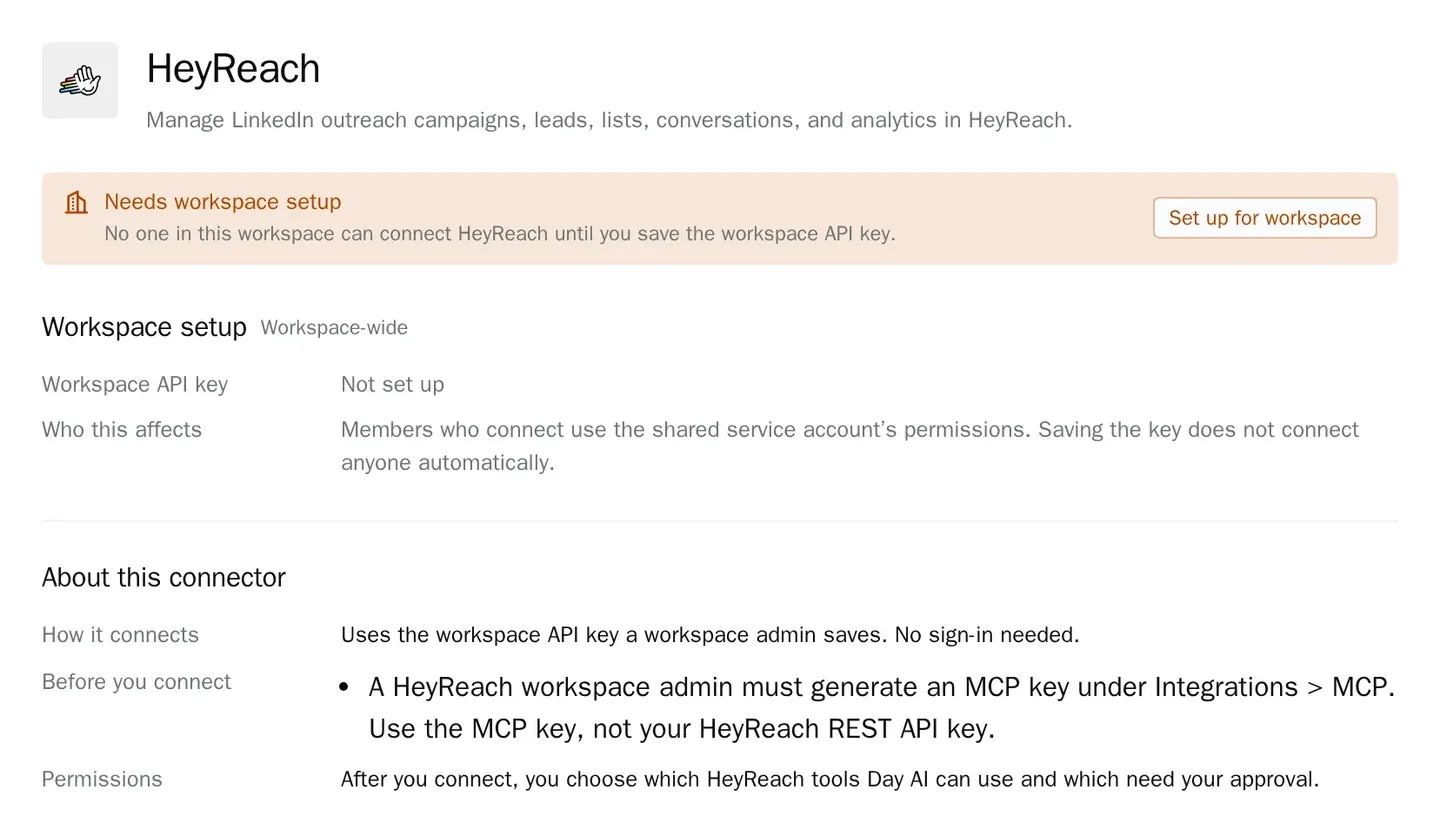
A HeyReach workspace admin opens Integrations > MCP in HeyReach and generates an MCP key. Use that key, not the HeyReach REST API key. In Day AI, the Owner opens Settings > Connectors, finds HeyReach (it's under CRM & sales in Browse connectors) and chooses Set up for workspace. Paste the key into the MCP Key field; the Get a HeyReach MCP key link in the dialog opens HeyReach if you still need one. Day AI checks the key before it saves. Until setup is done, HeyReach shows Needs workspace setup to people who can configure it and Admin setup required to everyone else.
Step 2: Each person connects HeyReach in Day AI
Once the key is saved, each person opens Settings > Connectors, finds HeyReach and clicks Connect. Every connected person uses the shared key, so their agent can see and act on the one HeyReach workspace the key belongs to, with that key's access. The connection still belongs to each person: it extends only their own agent, and disconnecting it leaves teammates connected.
Step 3: Keep HeyReach changes at Needs approval in Day AI
Under Tool permissions, reading campaigns, conversations and analytics can stay at Always allow. Leave tools that create lists or change campaigns at Needs approval, because they act on your real HeyReach account, and set anything you never want an agent to do to Off.
Step 4: Ask your Day AI agent to work in HeyReach
Start with questions that need both sides. "Who did the Acme team name on calls this month that we haven't reached on LinkedIn yet?" "Which HeyReach conversations got a reply this week, and do any of those people have a meeting with us?" "Create a HeyReach list of the people who joined yesterday's follow-up calls." The first two are reads; the third waits for your approval. For a weekly HeyReach analytics summary, ask the agent to build a skill and choose HeyReach in its Connectors picker. The skill reads HeyReach through its agent owner's connection, which here means the workspace the shared key belongs to; keep list and campaign changes in chat, where a person approves each one. See every Day AI integration and connector for what else that skill can read.
Where a homemade HeyReach setup breaks
- The wrong key. A script built on the REST API key, or a key from the wrong workspace, fails in ways nobody notices for a week. In Day AI, the MCP key is checked before it's saved.
- Lists built from searches alone. A search finds titles, not the people a buyer named on a call. In Day AI, the agent reads your calls and email first and proposes the list from them.
- Double outreach. Two reps message the same person because nobody checked the other's campaign. In Day AI, the agent looks up HeyReach conversations and campaigns before it proposes a new one.
- Campaign changes made by accident. An automation that can change campaigns will, eventually, at the wrong time. In Day AI, a campaign change waits as an approval card until a person says yes.